Collection page and product grid
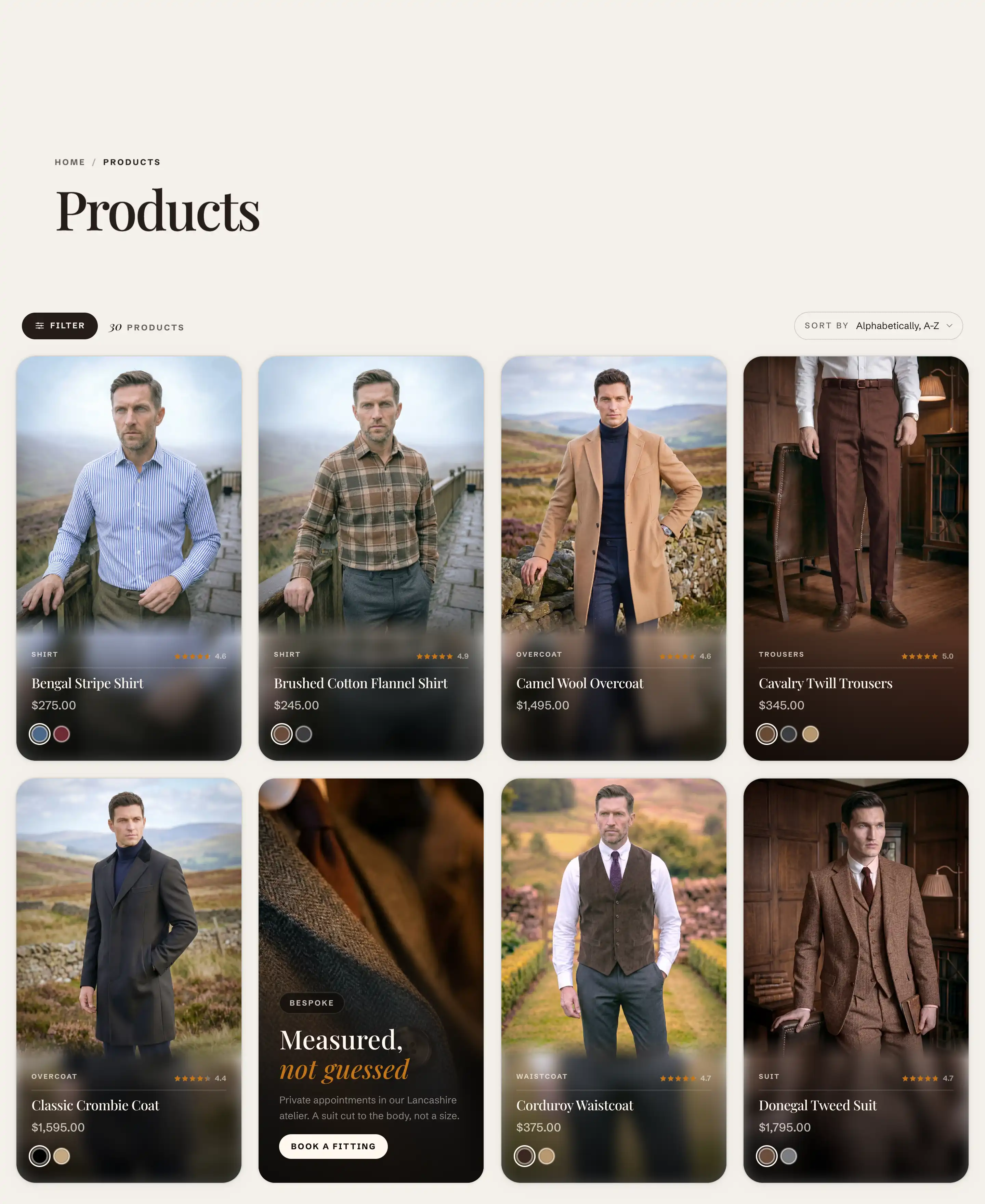
The Collection product grid is the main section of the collection template. It lays out a collection's products as a grid of cards and carries the filtering, sorting, and pagination controls. It is built into the template, so you edit it rather than add it from Add section. Every collection page in your store uses this template, so its settings apply to all of them.
Open it in the editor
- In the theme editor, open the template selector at the top of the screen.
- Choose Collections, then Default collection.
- In the section list, select Collection product grid.
To preview a real collection while you work, use the same selector to pick a specific collection from your store.
Each grid cell is a block named Product card, built from its own child blocks: Image, Title, Price, Label, Rating, and Swatches. Select the Product card in the section's blocks to change what every card shows. See The product card below.
Grid
- Products per page: how many products load at once, from 8 to 48. With Infinite scroll pagination this is the size of each batch as the shopper scrolls.
- Card size: the width of each card, which sets how many fit per row. Choose Small, Normal, or Large. Smaller cards fit more per row; larger cards show fewer, bigger cards.
- Pagination: how shoppers move through a long collection. Pages adds numbered page links at the bottom. Infinite scroll loads the next batch as the shopper reaches the end.
Filters and sort
This grid carries the collection's filtering and sorting controls (Enable filtering, Enable sorting, Expand filter groups by default, and Desktop filter layout). They have their own article: see Filtering and sorting.
Inline card
- Show inline card: inserts a single content card into the flow of products, after the first two product rows on the first page only. Off by default. Use it to drop a promotion or an editorial note among the products without breaking the grid.
When this is on, an Inline editorial card block appears in the section's blocks. Edit that block to set its content.
The product card
Each product is a Product card block, built from smaller blocks: Image, Title, Price, Label, Rating, and Swatches. To change what appears on every card (for example to hide the rating, or reorder the title and price), select the Product card block and edit its child blocks. Those changes apply to every product in the grid. There is no per product card setting.
Other settings
This section also uses the standard Color, Padding, Margin, and Visibility controls. See Common section settings.
Tips
- Products per page sets the batch size for Infinite scroll too, not only numbered pages. A smaller value loads faster on the first view and fetches more often as the shopper scrolls.
- The Inline editorial card lands at a fixed spot after the first two rows on page one, so it works as a single feature, not a repeating banner.