404 page
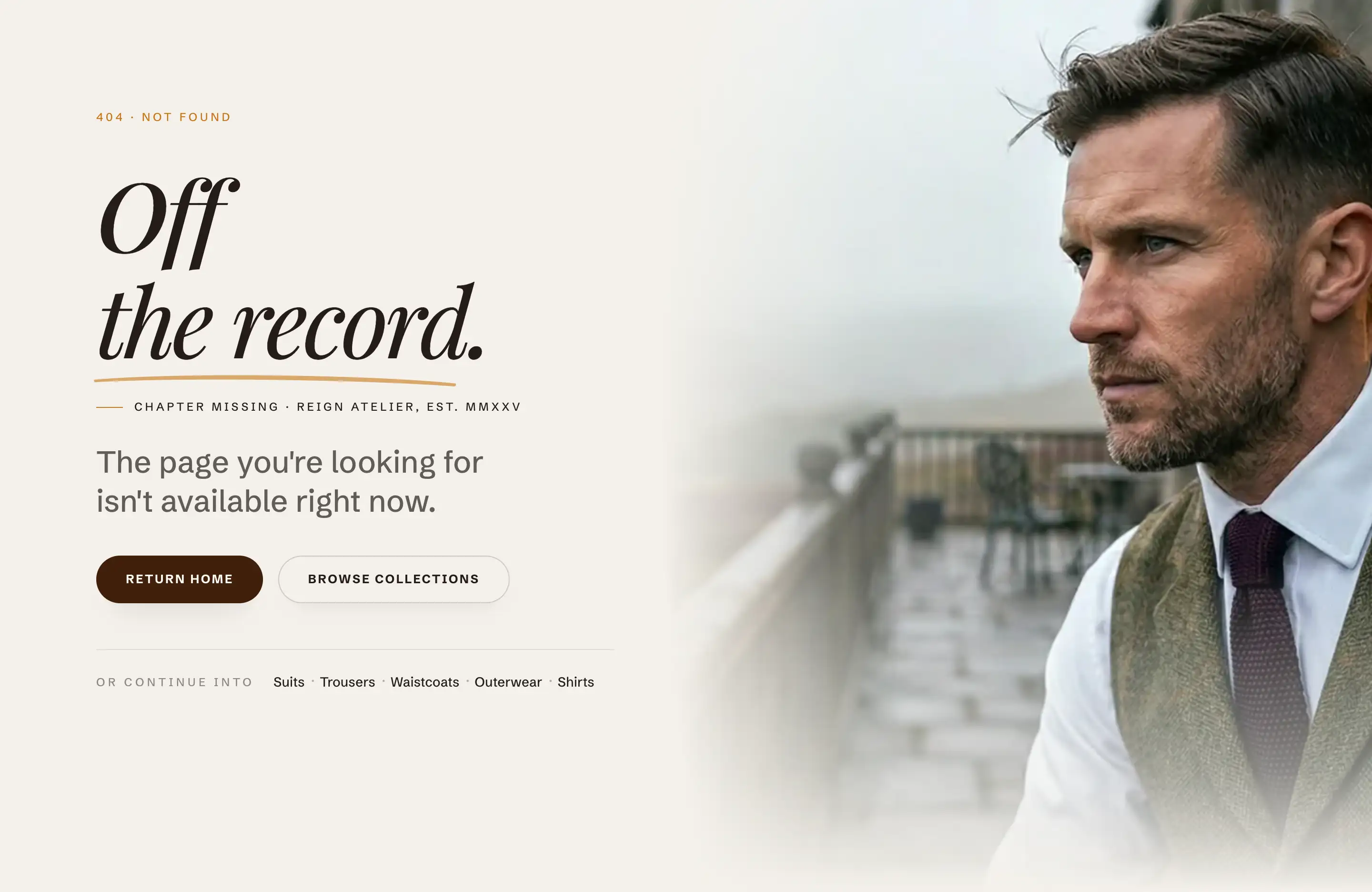
The 404 page is what a shopper sees after following a dead link: Shopify serves it automatically for any address that does not exist, using the 404 template. The theme ships it prebuilt with an eyebrow, a heading, a short message, two buttons (Return home, Browse collections), and a pair of quick links, all over an optional background image. You do not assign this template to anything; it just answers missing addresses.
Edit it
- In the theme editor, open the template selector at the top of the screen.
- Choose Others, then 404 page.
- Select the Page not found section.
Content
The section's text and buttons live in its Header content slot: open it in the block list and edit the blocks inside, the same way as any content slot (Sections, blocks, and groups). Reword the message, change where the buttons lead, or remove what you do not need.
Section settings
- Background image: the image behind the content. Leave it empty for a plain background from the color scheme.
- Color scheme: the colors for the page.
Tips
- Keep the buttons pointing at recovery paths: home, your catalog, or search. A dead end with an exit converts a lost shopper into a browsing one.
- If you set a busy Background image, check the text still reads well over it; a calmer crop or a darker scheme usually fixes it.