The Search Box section controls the overlay that appears when a customer clicks the search icon in the header. This feature is designed to guide customers immediately, offering helpful suggestions before they even begin typing.
Before Search Configuration
When the search overlay is opened but empty, you can display curated content to inspire visitors. This is managed through the Before search block located within the Search box section.
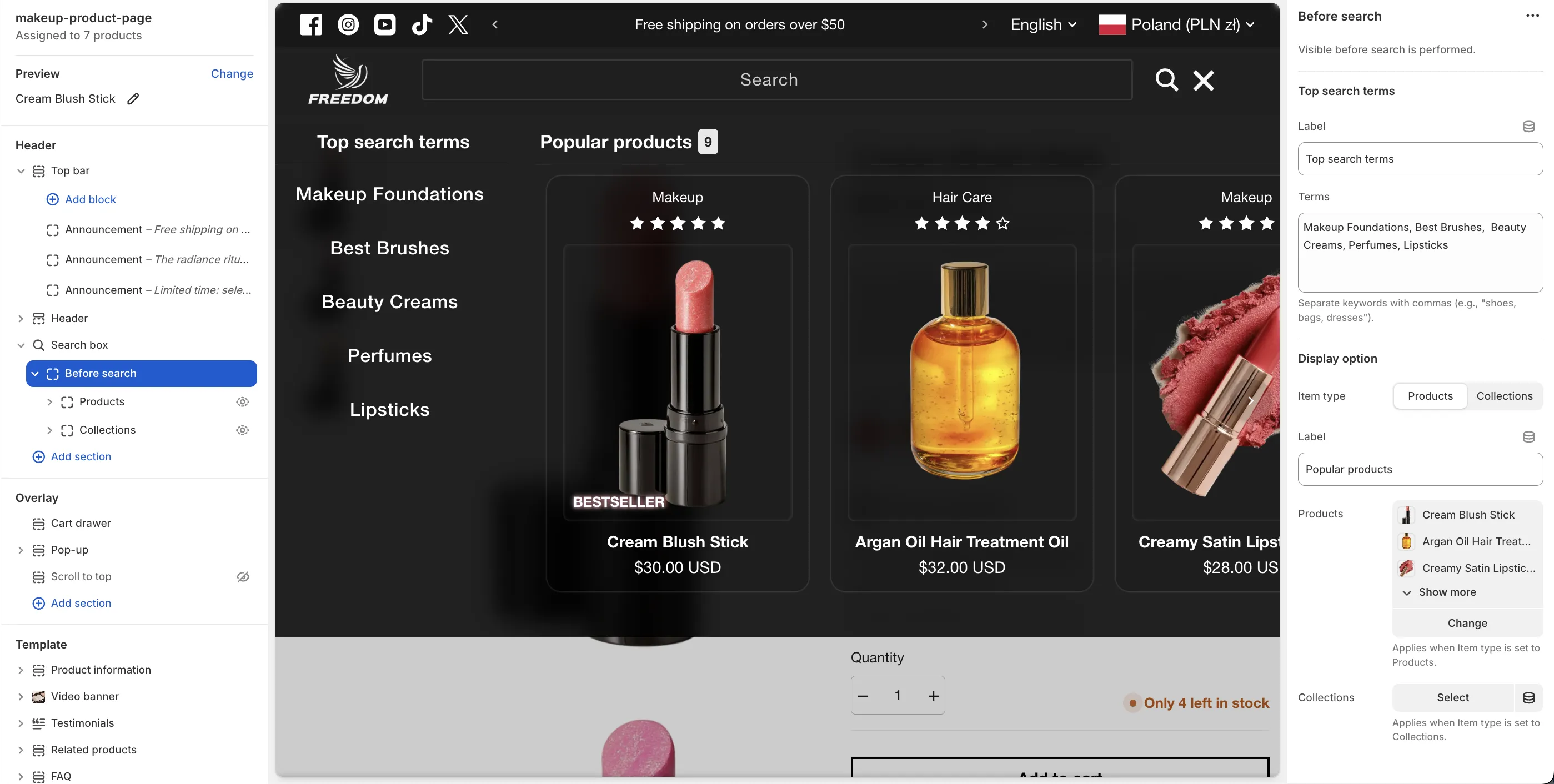
Top Search Terms
You can define a list of keywords to act as quick links for trending or common searches.
- In the Terms field, enter the words you want to display, separating them with commas (e.g., Dresses, Summer Sale, New Arrivals).
Popular Recommendations
You can also showcase specific items under a "Popular" heading to drive traffic to key areas of your store.
-
Item type: Choose whether to display Products or Collections.
-
Selection: Once the type is selected, assign the specific products or collections you wish to feature in this list.
While the Search Box focuses on these initial suggestions, it seamlessly transitions into a predictive search experience as soon as the user starts typing, automatically displaying relevant results.